留下你的信息

10 Essential Tips for Maintaining Your Lithium Battery Performance

Lithium batteries are vital in today's technology-driven world. Their use spans from smartphones to electric vehicles. According to a recent study by MarketsandMarkets, the global lithium battery market is projected to reach $100 billion by 2025. This growth highlights the importance of optimal battery performance.

Battery life can significantly impact user satisfaction. An underperforming lithium battery can lead to frustration. A 2022 survey indicated that 40% of users experience battery degradation within the first year. Knowing how to maintain lithium battery health is crucial. Simple practices can extend battery longevity and enhance performance.

Many factors influence battery life. Temperature, charge cycles, and storage conditions play key roles. Users often overlook these aspects. Regular maintenance can prevent unexpected failures. To maximize your lithium battery’s potential, adopting effective strategies is essential.

10 Essential Tips for Maintaining Your Lithium Battery Performance

Understanding Lithium Battery Chemistry and Performance Factors

10 Essential Tips for Maintaining Your Lithium Battery Performance

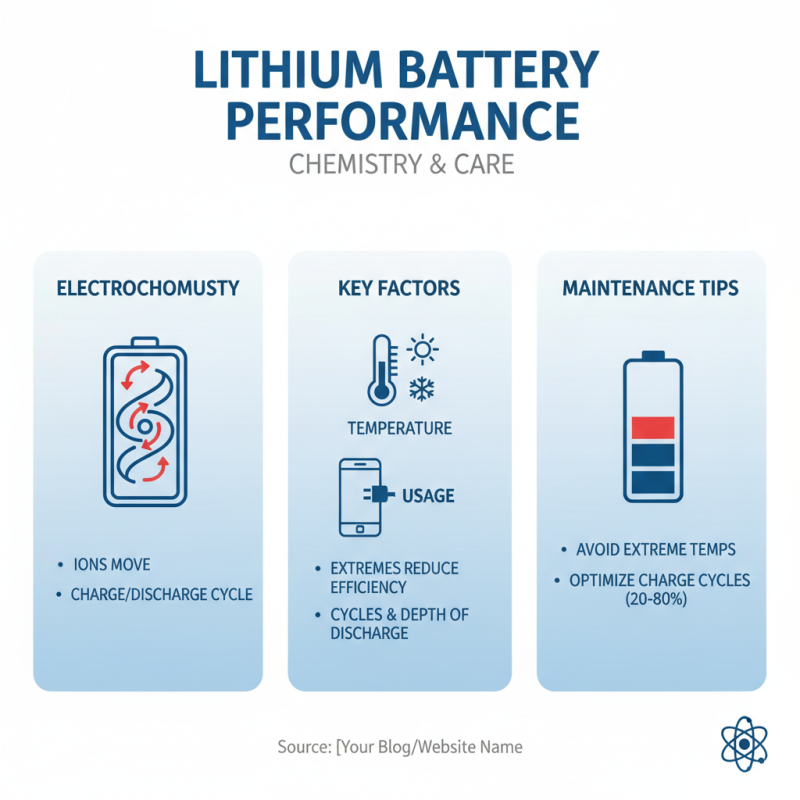
Lithium batteries power many devices today. Understanding their chemistry helps us maintain performance. The electrochemical processes within the battery are crucial. They determine how effectively it charges and discharges. Temperature and usage impact battery life significantly. When batteries operate under extreme temperatures, their efficiency drops.

Tip: Keep your battery between 20°C and 25°C for optimal performance. Avoid leaving devices in hot vehicles. Cold temperatures can also harm your battery. They lower the capacity, making devices sluggish.

Regular charging habits matter too. Frequent partial discharges are better than deep discharges. They help in maintaining the battery's health over time. Allowing a lithium battery to fall below 20% may lead to damage.

Tip: Charge your device when it hits around 30% battery life.

Monitoring your battery’s age can provide insights. As batteries get older, their ability to hold a charge wanes. A drop in performance may indicate it's time for a replacement. Reflecting on these areas can lead to better usage of lithium batteries.

Optimal Charging Practices for Longevity of Lithium Batteries

10 Essential Tips for Maintaining Your Lithium Battery Performance

Maintaining your lithium battery properly is crucial for its longevity. One important practice is to avoid letting your battery drop to 0%. Low battery levels can cause damage over time. Charge your device when it reaches around 20%. This simple act can greatly enhance your battery’s lifespan.

Consider your charging environment as well. Extreme temperatures can harm lithium batteries. Try to keep your devices in a cool, dry location when charging. If you often use your device while it charges, it might heat up. This is not ideal for battery health. It’s better to let your device cool down when you can.

Check how long you leave your device plugged in. Overcharging can be harmful, even with modern technology designed to prevent it. Unplugging after it’s fully charged can help. Sometimes we forget this simple step. Reflect on your habits; they might be hurting your battery life. Each small change adds up to better performance and longer battery health.

Proper Storage Techniques to Enhance Battery Life

Proper storage techniques are vital for enhancing lithium battery life. Studies show that batteries stored improperly can lose up to 30% of their capacity in just a few months. For optimal performance, store lithium batteries in a cool, dry place. Ideally, temperatures should range from 32°F to 60°F. Extreme heat is detrimental, accelerating chemical reactions that degrade battery life.


Additionally, charge levels matter. Keeping batteries at around 40% charge during storage is recommended. Fully charging or depleting them can lead to harmful stress. According to industry data, maintaining this mid-range charge can extend battery cycle life significantly. Remember, always avoid humid conditions. Humidity can foster corrosion and internal damage.


All batteries degrade over time, regardless of care. Even with perfect storage, expect some decline. Users need to reflect on their usage patterns. Neglecting storage conditions can lead to reduced performance. Understanding these nuances can empower better care and longer battery life.

Temperature Management: The Key to Maintaining Battery Health

Temperature plays a crucial role in maintaining lithium battery health. Extreme temperatures can significantly impact performance and lifespan. High heat can lead to increased chemical reactions within the battery, causing damage. In colder conditions, the battery’s efficiency declines, resulting in shorter usage times.

Finding an optimal temperature range is essential. Aim to keep batteries between 20°C to 25°C. Avoid leaving them in hot cars or under direct sunlight. Conversely, storing batteries in a refrigerator may help in cold climates, but avoid frost. Even minor fluctuations can affect the battery's longevity.

Monitoring the charging environment is equally important. Using chargers designed for specific batteries can prevent overheating. Regularly check the battery's temperature, especially during heavy usage. A consistently high temperature means it’s time for an evaluation. This is where reflection becomes crucial: Are you putting your battery through unnecessary stress? It’s worth considering how environment affects performance.

Battery Temperature Management Impact on Performance

This chart illustrates the impact of temperature on lithium battery capacity. As the temperature increases from 0°C to 20°C, the battery capacity reaches its peak at 100%. However, as temperatures rise beyond 30°C, the capacity starts to decline, highlighting the importance of temperature management for optimal battery performance.

Recognizing Signs of Lithium Battery Degradation and How to Respond

As lithium batteries age, performance can drop significantly. Research shows that over 20% of battery capacity may be lost within just two years of use. Recognizing degradation signs is crucial for maintaining efficiency. Check for rapid discharges and reduced charge cycles. These symptoms often indicate that the battery's internal chemistry is shifting.

Visual changes can signal trouble. A swollen battery case, seen more frequently in older units, means it's time for action. Temperature fluctuations also play a part. Excessively hot or cold conditions can accelerate wear. Manufacturers recommend keeping batteries in temperature ranges between 20°C to 25°C to maximize lifespan.

Lastly, monitor charging habits. Frequent full discharges can shorten battery life drastically. A study found that discharging below 20% may reduce overall cycles by up to 30%. Creating a habit of partial charges can mitigate degradation. Reflecting on these practices can help users prolong their battery performance effectively.

10 Essential Tips for Maintaining Your Lithium Battery Performance

Tip Description Signs of Degradation Response Action
Avoid Extreme Temperatures Keep your battery between 20°C to 25°C for optimal performance. Overheating or freezing. Store batteries in a cool, dry place.
Regularly Charge and Discharge Use your battery regularly to maintain its capacity. Reduced charging capacity. Perform a full cycle every couple of months.
Monitor Voltage Levels Check voltage periodically for safety and efficiency. Fluctuating voltage readings. Recharge immediately if voltage drops significantly.
Avoid Deep Discharge Never allow battery to discharge below 20%. Battery takes longer to charge. Charge before it drops to critical levels.
Use the Right Charger Always use the charger designed for your battery. Overheating during charging. Switch to the appropriate charger.
Clean Battery Contacts Keep contacts free of dust and corrosion. Intermittent power loss. Use a dry cloth to clean contacts regularly.
Store Properly If not in use, store at 50% charge and in a cool place. Loss of capacity over time. Follow proper storage guidelines.
Watch for Swelling Inspect battery for physical changes. Visible swelling or bulging. Replace the battery immediately.
Limit High-Drain Use Avoid using all high-drain applications at once. Decreasing runtime. Space out high-drain use for longevity.
Check for Firmware Updates Keep device firmware up to date for better performance. Unexpected device shut down. Regularly check and update firmware.